AI-written MCQ tests
AI writes your MCQ tests. You just review and publish.
For academies preparing students for cadet colleges, MDCAT, ECAT, NTS, PPSC/FPSC and school exams.
Type a topic, and get ready-to-use questions with answers in minutes. Students take the test on their phones, it's marked instantly, and you see who needs help, without writing or marking a single paper.
14 days free · No payment needed
Sound familiar?
Writing papers by hand takes hours every week.
Marking a stack of answer sheets takes your weekend.
You find out who's falling behind only after the result.
How it works
- 1
Register your academy
Start your free trial. We'll help you set up your teachers and students.
- 2
Let AI write your test
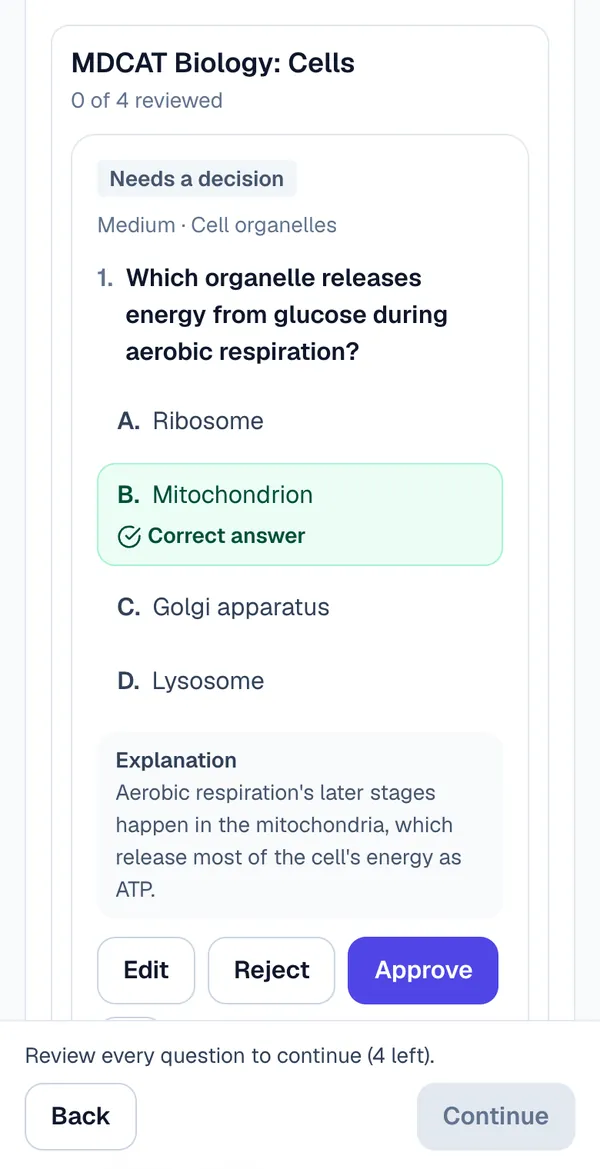
List the topics and the AI writes the questions — you check every one before students see it. Or import your own.
- 3
Students take it on their phones
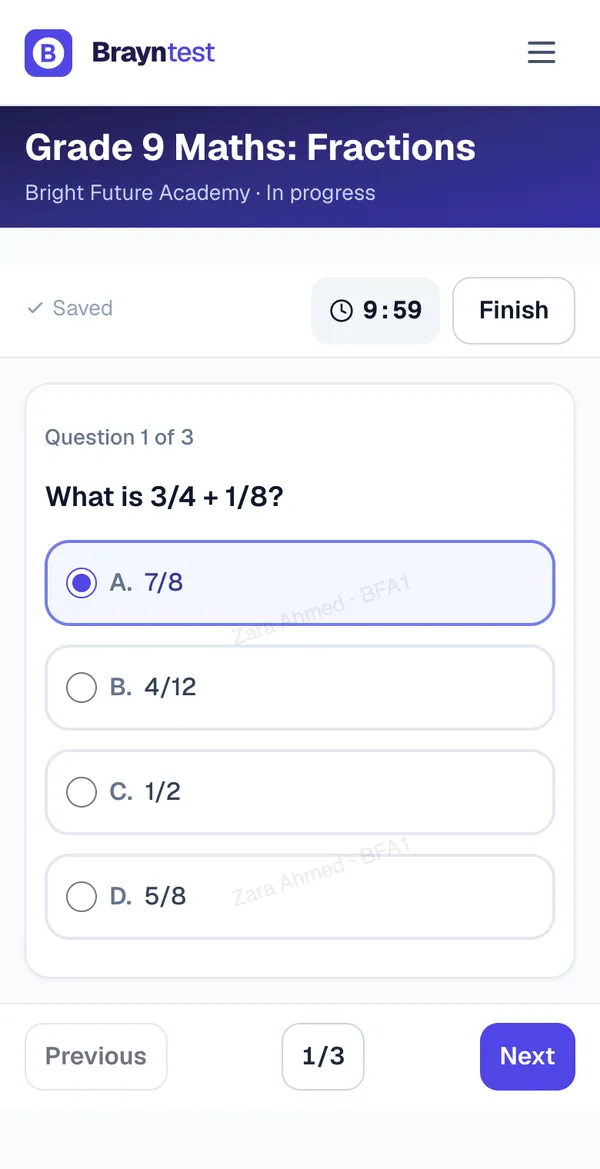
It's marked the moment they submit, and you see the results.
What you get
AI writes the questions
Type a topic and class, and get MCQs with correct answers in minutes. Every question is checked by AI, then approved by you.
Hours saved
No typing, photocopying or marking papers.
Marked instantly
Every score, the moment a student submits.
See who needs help
Weak topics and students falling behind, on your dashboard.
Like the real test
Parts, time limits and pass marks, the way your students' test works.
Any phone
Nothing to install, and it works on slow connections.
Urdu too
Urdu questions read right to left, in a proper Urdu font.
See it on a phone
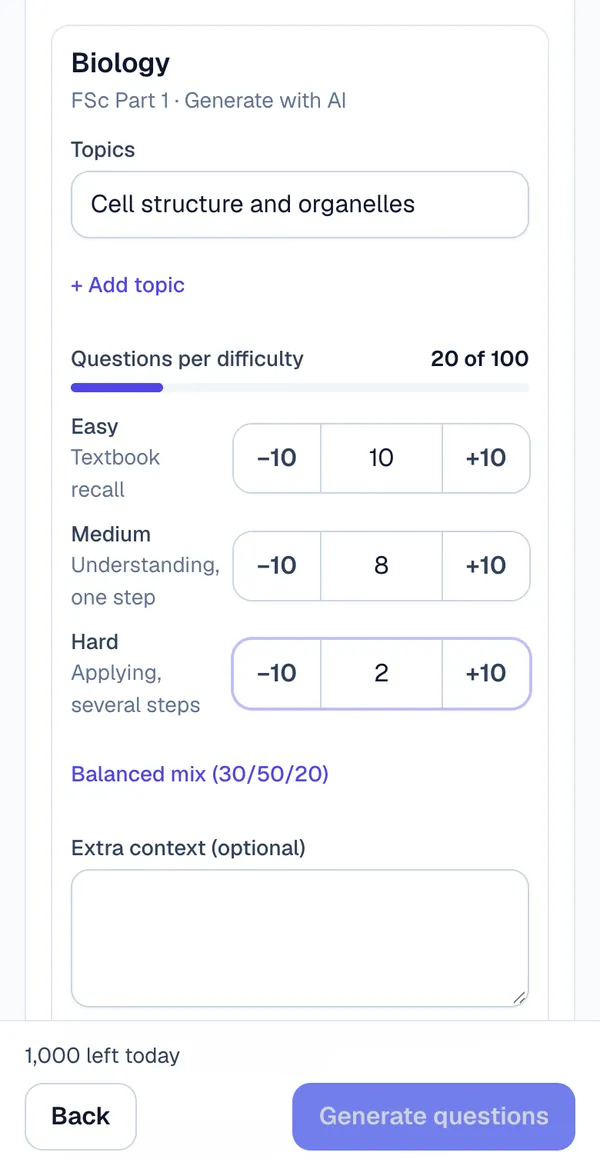
Type a topic
AI writes the questions; you approve
Students take the test
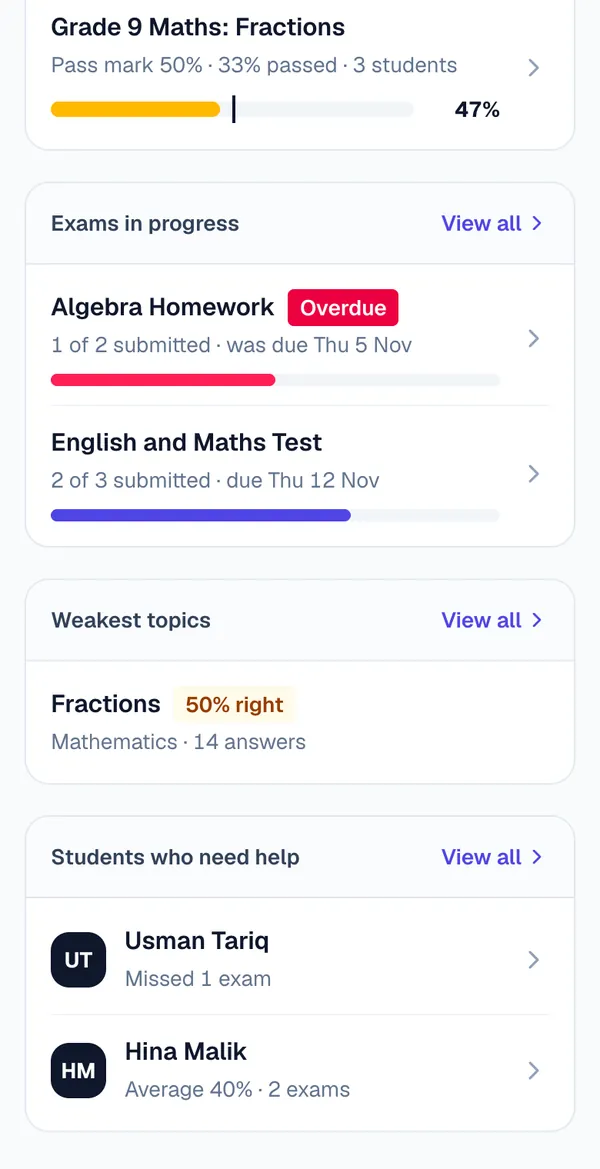
See weak topics and who needs help
Try Brayntest free for 14 days
No payment needed. Register your academy, and we'll help you set up.
Register your academySimple pricing
Every plan starts with a 14-day free trial.
50 students
Rs 2,000 a month
500 AI questions a day · 4,000 a month
- Most popular
100 students
Rs 4,000 a month
500 AI questions a day · 6,000 a month
150 students
Rs 6,000 a month
750 AI questions a day · 8,000 a month
200 students
Rs 8,000 a month
1,000 AI questions a day · 10,000 a month
Free trial (14 days): 200 AI questions a day, 1,000 in total.
Prices are per month for your whole academy — all students included.
Every plan includes all features:
- Unlimited tests
- AI questions, within your plan's limits
- Instant marking
- Student progress
- Urdu support
More than 200 students? WhatsApp us for a custom plan.
Questions
How does the 14-day free trial work?
Register your academy at brayntest.com with your name, the academy's name, your WhatsApp number, email and a password: your academy opens at once, and your 14-day trial starts then. Open the link we email you to confirm your email. The trial has every feature, up to 150 students, 200 AI questions a day (1,000 in all; 20 until you confirm your email), and no card or payment. It comes with a ready-made sample test to try.
Is Rs 2,000 per student?
No. Prices are per month for your whole academy, with all your students and teachers included. Rs 2,000 a month is the 50 students plan, for up to 50 students.
What happens when the trial ends?
Your academy becomes read-only until you choose a plan. Everyone can still sign in and see every exam, question and result, and nothing is deleted. But exams can't be created, published, printed or started, and students can't be added, until then. A student already in the middle of an exam can always finish it. Your dashboard shows the days left all through the trial; in the last 3 days it reminds you, and we email you 3 days before and on the last day.
I'm a single teacher, or teach at a government school. Can I use it?
Yes. Register yourself as the academy: use your own name or your school's name as the academy name. As its owner you build exams and add students yourself; adding teachers is optional.
Does the AI write the options and correct answers too?
Yes. For every question it writes four options (A to D), marks the correct one and adds a short explanation. You choose the topics and how many questions: a balanced mix of easy, medium and hard, or your own.
Can the AI make questions from my own book or notes?
Yes. While building an exam, attach the pages as a PDF (up to 10 pages) or a photo (JPG, PNG or WebP), and the AI writes its questions from them. In the Simple builder it's under More options.
Are the AI's questions always correct?
No AI is right every time, so always read the questions before publishing. After writing them, a second AI review checks every answer and flags anything doubtful (a wrong answer, unclear wording, an option that gives the answer away) with the reason, so you can look at those first.
Is Urdu supported?
Yes. The AI can write Urdu questions (shown right to left). Please review them carefully before publishing.
Do students need an email address?
No. Each student signs in with a Student ID (your academy's code and their roll number, like BFA23) and a password. An email is optional, and Brayntest never emails students.
Can students take tests on a phone?
Yes, in the browser of any phone with internet; there's nothing to install. The time left stays at the top, answers are saved as they go (even if the connection drops for a moment), and the result shows right after submitting, unless the teacher chose to release results later.
Read the guide: Sign in with your Student ID and take a test
Who can see my academy's data?
Only your academy's owner and teachers, each student their own results, each family their own child's progress reports (through the private link you send them), and Brayntest's support team when helping you. It's stored on secure servers in Singapore, backed up every night, never sold, and students' details are never sent to the AI.
Still have a question? WhatsApp us.